The only scalable delete in Postgres is DROP TABLE
The only scalable delete in Postgres is DROP TABLE
By Tom Pang | June 11, 2026
It sounds paradoxical, but performing large DELETE operations actually increases the workload on your database. Based on real-world experience, the most efficient way to handle massive data removal in Postgres is to avoid row-level deletion entirely and instead focus on removing entire tables.
Large-scale DELETE batches are problematic because they don't immediately reclaim disk space, they create significant write and replication pressure, and they are generally inefficient for cleaning up millions of rows. If your application requires frequent or massive data purging, you should design your schema to utilize DROP TABLE or TRUNCATE.
Why DELETE Operations Are Costly
To understand why DELETE is slow, we have to look at Multi-Version Concurrency Control (MVCC). This is a fundamental design pillar of Postgres that allows different transactions to see a consistent snapshot of data as it existed when the query began.
The MVCC Lifecycle
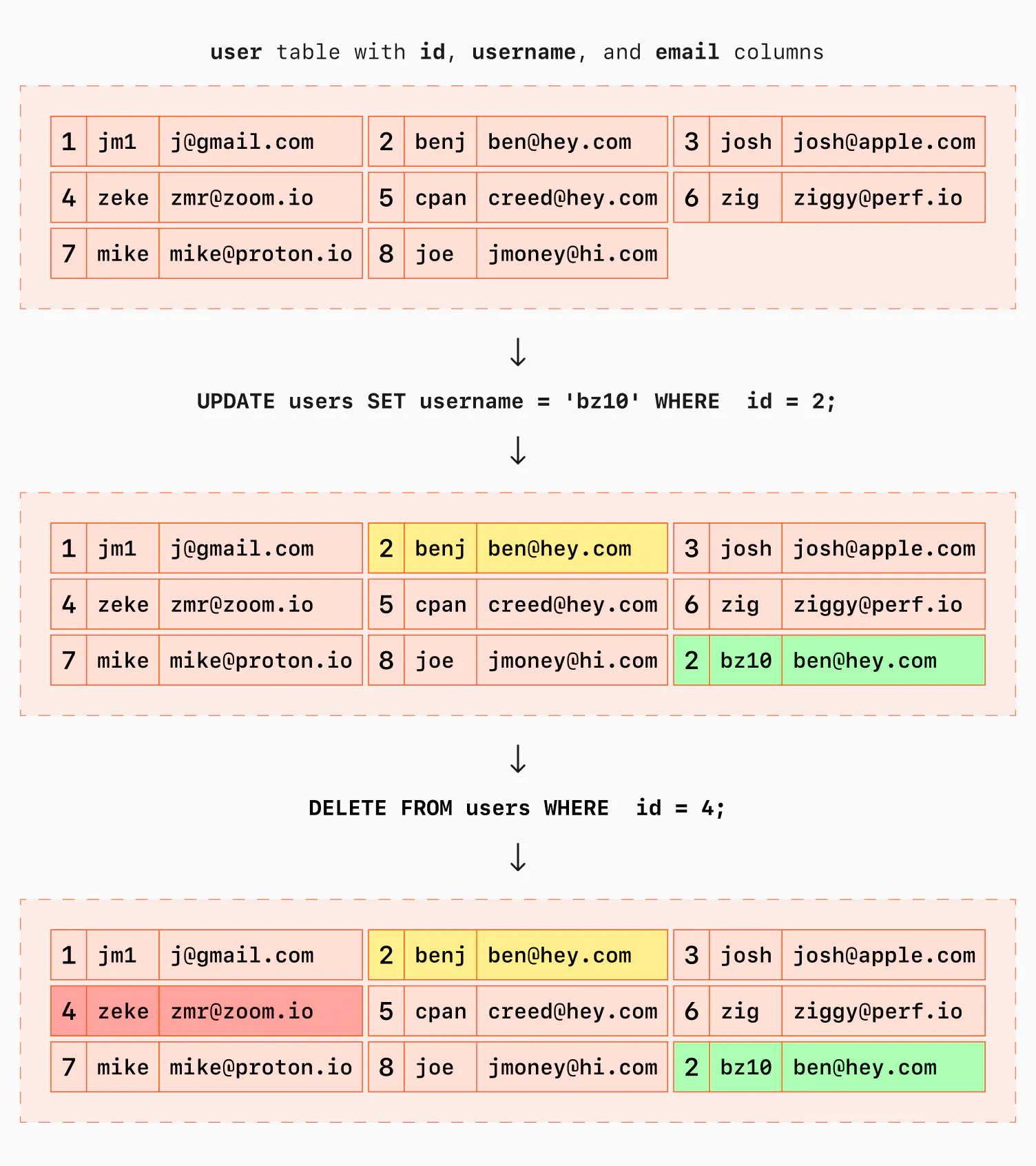
When you "delete" a row, Postgres doesn't actually erase the bytes from the disk immediately. Instead:
- The row is marked as a "dead tuple."
- It remains on the disk alongside active rows.
- Postgres uses visibility maps and transaction IDs to tell readers to ignore these dead tuples.
- Eventually, a
vacuumprocess identifies these bytes as free space that can be overwritten by new data.
The Hidden Overheads
- Replication Lag: Deletes are essentially writes. In synchronous or semi-synchronous setups, large
DELETEoperations can block other writers while waiting for the deletion to replicate. - Disk Space: Neither
DELETEnorautovacuumtypically return space to the OS. They only make space available for internal reuse. WhileVACUUM FULLcan return space to the OS, it requires an expensive, long-term lock. - Index Bloat:
DELETEdoes not immediately clean up index data. Readers must still traverse the index and then determine if the resulting tuple is dead. (Though there is a "best-effort" optimization where index scans can mark entries as dead). - Cascading Effects: Using
CASCADEwith foreign keys can turn a simple single-row delete into a multi-gigabyte purge, triggering all the issues mentioned above.
Pro Tip: If you want to dive deeper into maintaining healthy queues, research the specifics of Postgres MVCC and how it impacts long-running transactions.
The Efficiency of DROP and TRUNCATE
While DROP TABLE and TRUNCATE require a heavyweight AccessExclusiveLock, their performance is largely independent of the amount of data being removed.
Physical Layer Advantages
Instead of marking individual rows, these commands:
- Remove the files directly from the operating system.
- Clear the Postgres buffer cache of related pages.
The cache sweep is highly optimized. Postgres maintains a BufferDesc header (padded to 64 bytes) for every 8KB buffer. The system scans these headers rather than the actual data pages.
The Math: The overhead is roughly:
For example, if you have of shared buffers, Postgres only needs to scan of memory sequentially, which is nearly instantaneous on modern hardware.
Comparison: DELETE vs. DROP/TRUNCATE
| Feature | DELETE | DROP / TRUNCATE |
|---|---|---|
| Disk Space | Reclaimed internally (slowly) | Returned to OS immediately |
| MVCC Impact | Creates dead tuples | Zero dead tuples |
| Vacuum Debt | High | None |
| Replication | High write overhead | Metadata change (minimal) |
| Locking | Row-level (usually) | AccessExclusiveLock (heavy) |
Strategy: Handling One-Off "Junk" Deletions
Imagine a scenario where a bug causes your database to be flooded with millions of "junk" rows, but you need to keep a small subset of valid data. Deleting the junk is the wrong approach; instead, perform "database surgery."
The "Keep-Table" Workflow
If you can afford a few minutes of downtime (locking the table), use Postgres's transactional DDL:
- Step 1: Start a transaction and lock the table.
- Step 2: Copy the "good" data into a temporary table.
- Step 3: Wipe the original table completely.
- Step 4: Re-insert the "good" data.
BEGIN;

-- Prevent any other reads/writes for consistency
LOCK TABLE big_table IN ACCESS EXCLUSIVE MODE;

-- Save the data you actually want to keep
CREATE TEMP TABLE temp_keep_big_table AS
SELECT * FROM big_table
WHERE updated_at >= '2026-04-01';

-- Scalable removal of all data
TRUNCATE big_table;

-- Restore the valid subset
INSERT INTO big_table SELECT * FROM temp_keep_big_table;

COMMIT;
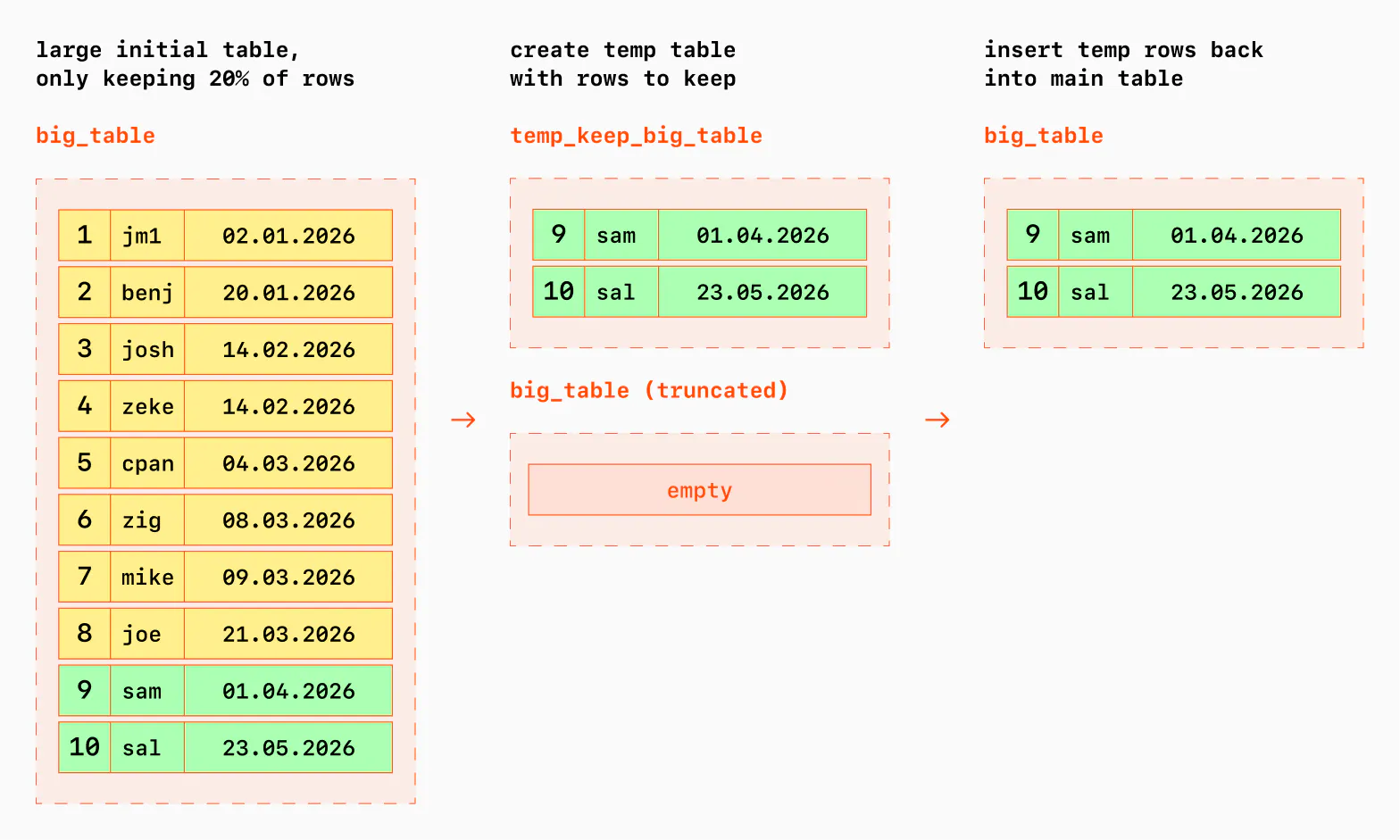
Why this works: The only data written to the Write Ahead Log (WAL) are the rows you actually kept.
Alternatives for High Availability
If an AccessExclusiveLock is unacceptable:
- Mirroring: Use triggers to mirror writes to a new table, then perform an atomic rename to swap them.
- Bloat Tools: Tools like
pg_squeeze(a modern successor topg_repack) can optimize tables that already have significant bloat. However, the goal should be to prevent bloat via schema design rather than fixing it after the fact.
Ongoing Maintenance: Partitioning
For applications that constantly generate and expire data, the best approach is Age-Based Partitioning. By splitting a large table into smaller, time-based chunks, you can simply DROP an entire partition when the data expires.
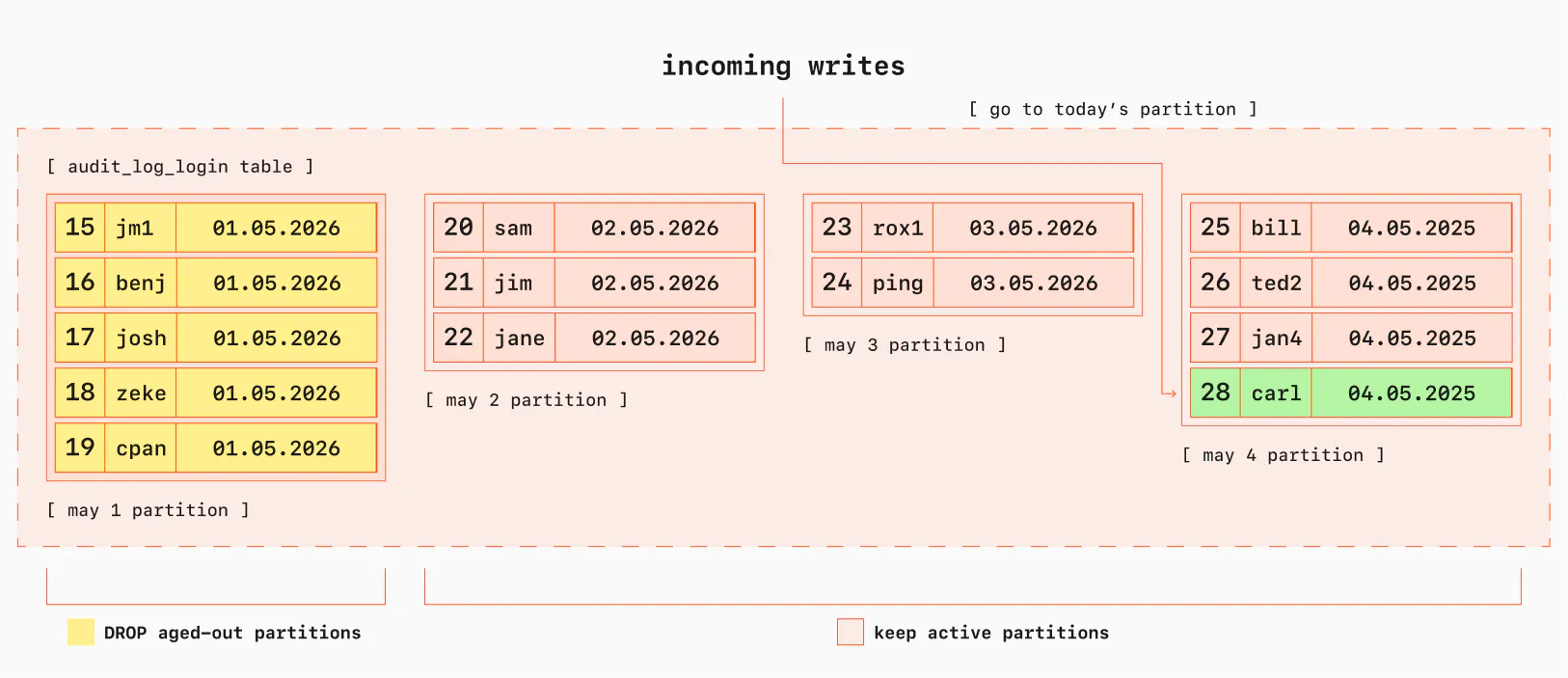
Summary: To scale your deletes, stop thinking about rows and start thinking about tables. Go forth and DROP.