MicroVMs: Run isolated sandboxes with full lifecycle control
MicroVMs: Run isolated sandboxes with full lifecycle control
AWS has officially unveiled AWS Lambda MicroVMs, a sophisticated serverless compute primitive designed specifically for executing user-provided or AI-generated code within isolated, stateful environments.
This offering provides the gold standard of virtual machine-level isolation combined with the agility of near-instantaneous launch and resume capabilities. Developers now have direct authority over the environment's state and lifecycle without the burden of managing underlying infrastructure or mastering the intricacies of virtualization.
At its core, this service is driven by Firecracker, the lightweight virtualization engine that already supports over 15 trillion monthly invocations for standard Lambda functions.
🎯 The Market Need: Why MicroVMs?
A new generation of multi-tenant applications requires a dedicated, secure execution sandbox for every single user to run untrusted code. Examples include:
- AI-powered coding assistants
- Interactive development environments (IDEs)
- Data analytics platforms
- Vulnerability scanning tools
- Game servers utilizing user-defined scripts
Previously, developers were forced to make a compromise difficult choice between three suboptimal paths:
| Technology | Isolation Level | Startup Speed | State Persistence |
|---|---|---|---|
| Virtual Machines | High (Hardware) | Slow (Minutes) | Persistent |
| Containers | Medium (Shared Kernel) | Fast (Seconds) | Ephemeral/External |
| FaaS (Functions) | High (Managed) | Very Fast | Stateless/Request-based |
"Developers were either accepting performance trade-offs or spending massive engineering effort building custom virtualization stacks, diverting focus from their actual product."
Lambda MicroVMs solve this by providing a dedicated environment per session that boots rapidly, maintains memory and disk state, and enters a low-cost idle state when inactive.
🛠️ Hands-On Implementation
To test this, I accessed the AWS Lambda console and selected Lambda MicroVMs from the navigation menu.
Step-by-Step Setup
- Package Flask application and Dockerfile into a
.ziparchive. - Upload the archive to an Amazon S3 bucket.
- Define the application logic and environment.
1. The Application (app.py)
import logging
from flask import Flask, jsonify

app = Flask(__name__)
logging.basicConfig(level=logging.INFO)

@app.route("/")
def hello():
    app.logger.info("Received request to hello world endpoint")
    return jsonify(message="Hello, World!")

if __name__ == "__main__":
    app.run(host="0.0.0.0", port=5000)
2. The Environment (Dockerfile)
FROM public.ecr.aws/lambda/microvms:al2023-minimal
RUN dnf install -y python3 python3-pip && dnf clean all
WORKDIR /app
COPY requirements.txt .
RUN pip install --no-cache-dir -r requirements.txt
COPY app.py .
EXPOSE 5000
CMD ["gunicorn", "--bind", "0.0.0.0:5000", "app:app"]
Creating and Launching the VM
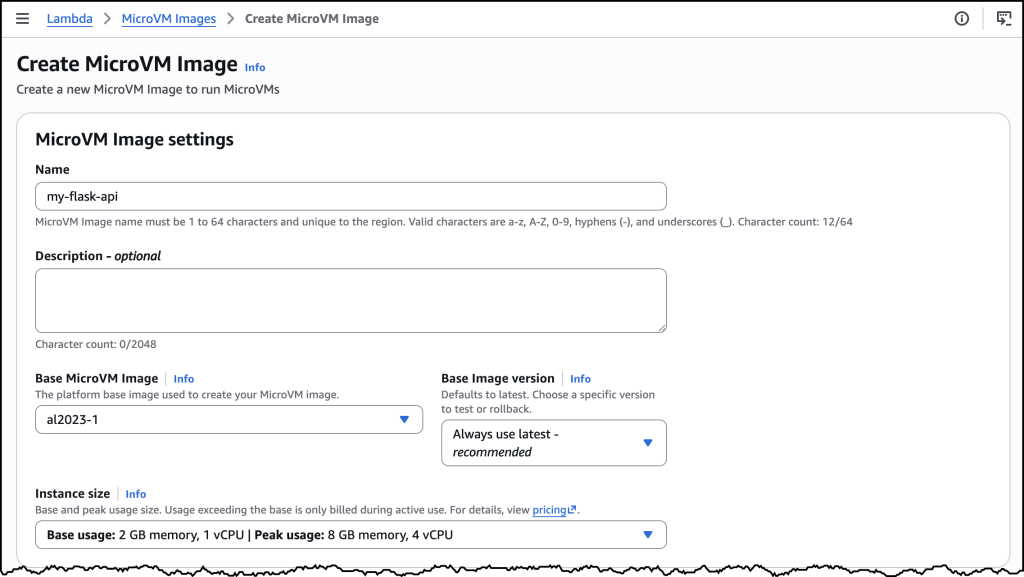
I used the AWS CLI to generate the MicroVM image:
aws lambda-microvms create-microvm-image \
--code-artifact uri=path/to/s3/artifact.zip --name VM_image_name \
--base-image-arn arn:aws:lambda:us-east-1:aws:microvm-image:al2023-1 \
--build-role-arn IAM_ROLE_ARN
The Process: Lambda fetches the zip executes the Dockerfile initializes the app creates a Firecracker snapshot of the memory and disk.
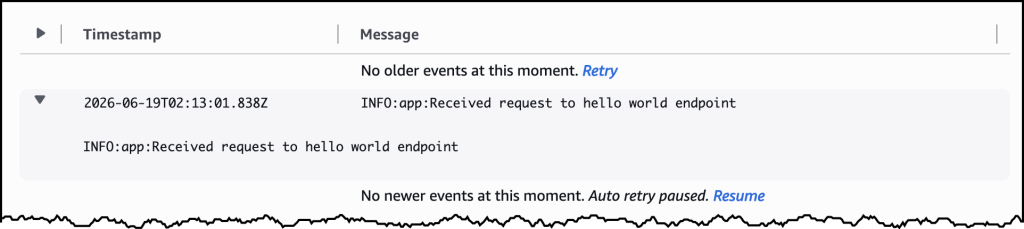
Note: Build logs are streamed to CloudWatch at /aws/lambda/microvms/image-name.
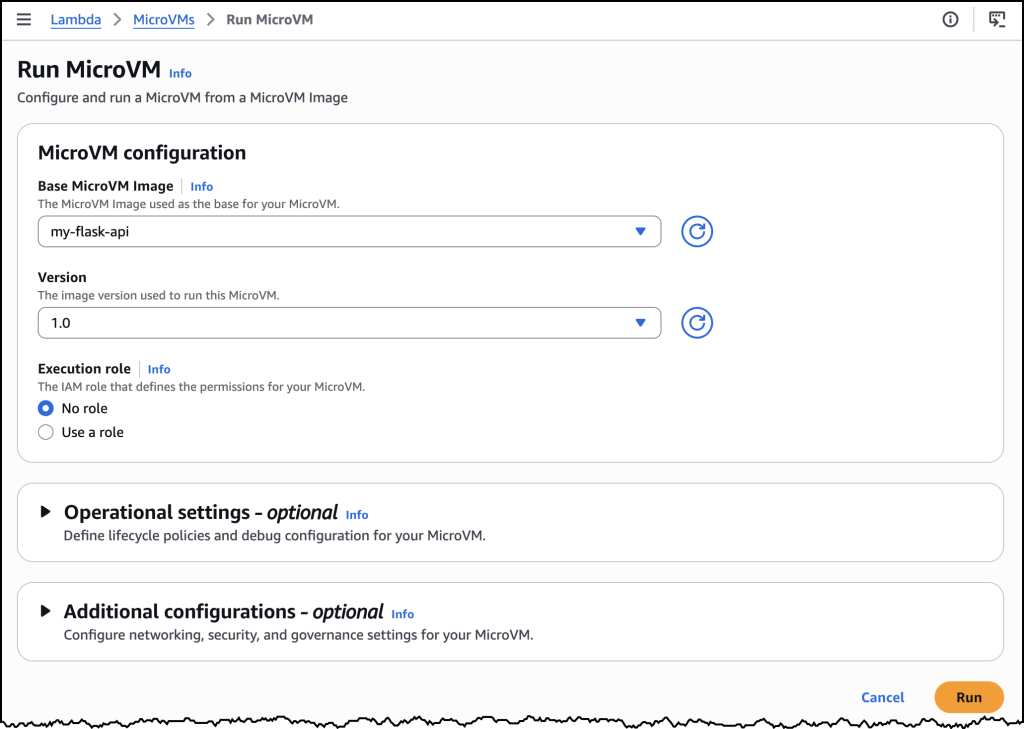
Deployment Command:
aws lambda-microvms run-microvm \
--image-identifier arn:aws:lambda:region:acct:microvm-image:my-image \
--execution-role-arn arn:aws:iam::acct:role/MicroVMExecutionRole \
--idle-policy '{"maxIdleDurationSeconds":900,"suspendedDurationSeconds":300,"autoResumeEnabled":true}'
Testing the Lifecycle
Upon execution, Lambda provides a unique ID and a dedicated endpoint URL. Because it resumes from a snapshot, the Flask app is live instantly.
- Traffic: I used a short-lived auth token passed via the
X-aws-proxy-authheader. - Suspension: After 15 minutes of inactivity (per the
idle-policy), the VM was suspended. - Resumption: A new request triggered an immediate resume, with all application state perfectly preserved.
⚙️ How it Works: The Technical Core
Lambda MicroVMs combine three distinct capabilities into one service:
- Hardware-Level Isolation: Utilizing Firecracker, each session has its own kernel. There is zero resource sharing between users, ensuring that malicious code is strictly contained.
- Image-Based Workflow: The "image-then-launch" model allows for pre-baked environments.
- Stateful Snapshots: The ability to freeze and thaw the entire VM state.
Lifecycle Visualization
The Efficiency Equation
We can represent the value proposition of MicroVMs as:
By minimizing the denominator (latency) while maximizing the numerator (isolation and state), AWS provides a high-utility primitive for modern app development.