NUMA: Cores, memory, and the distance between them
NUMA: Cores, Memory, and the Distance Between Them
The Scenario: Imagine two virtual machines residing on the same physical host. They are configured identically and are executing the exact same workload. There is no resource contention from other tenants, the host is healthy, and the workload itself is optimized.
Yet, one VM is significantly slower than the other.
The culprit? The slow VM's memory is located on the "wrong side" of a hardware interconnect relative to the CPUs processing the data. For the operator, there is no setting inside the guest OS that can rectify this.
To solve this, Edera has implemented a comprehensive suite of updates to make Xen-based virtualization fully NUMA-aware. This integration spans the entire pipeline:
- Inside the guest environment.
- Through paravirtual I/O drivers.
- Into
dom0. - Back to the hypervisor's mapping of the physical hardware.
Some of these implementations are, to our knowledge, industry firsts. To understand the importance of this work, we must first define what NUMA actually is.
From UMA to Multi-Socket Architecture
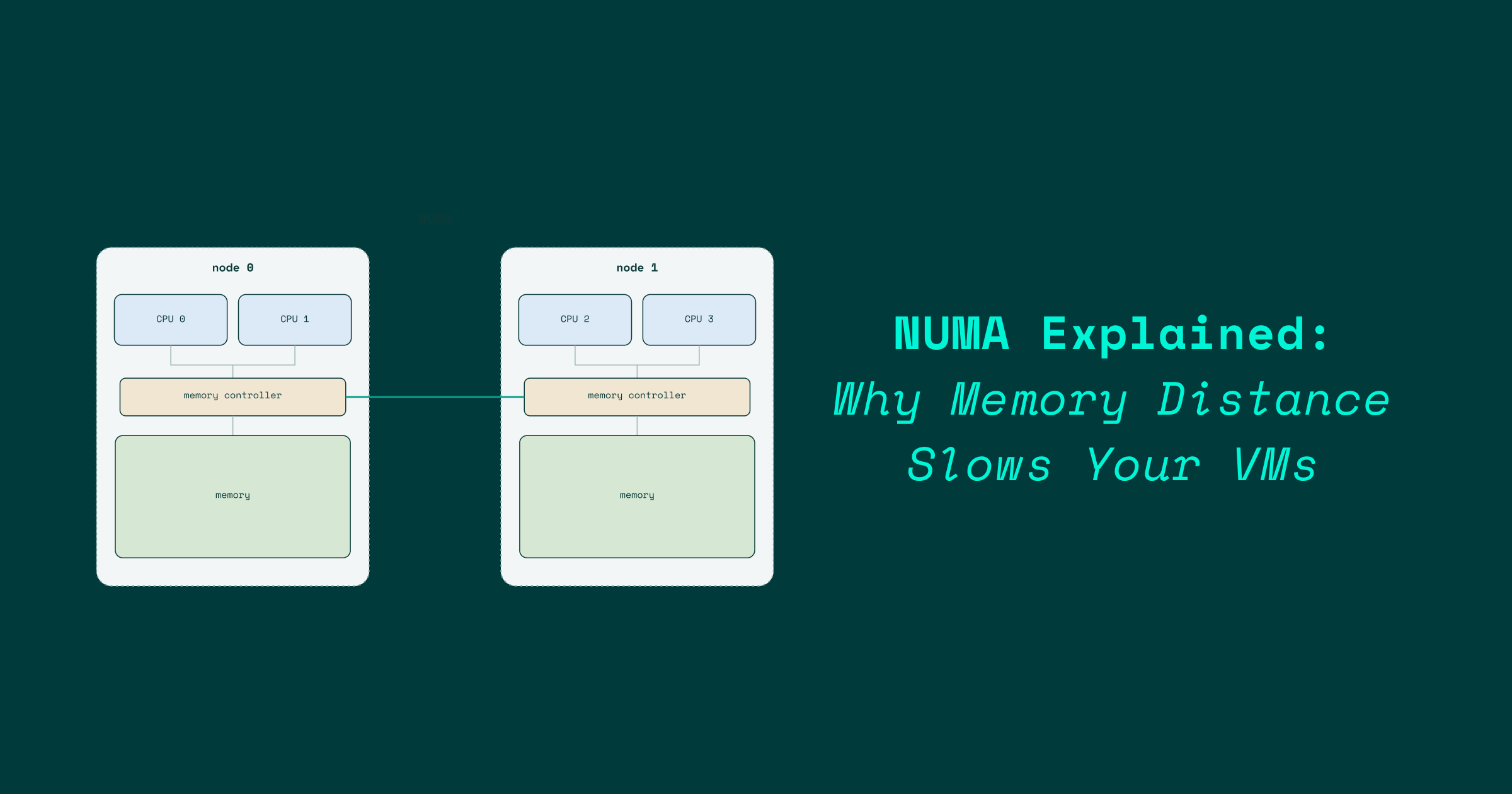
NUMA stands for Non-Uniform Memory Access. As the name suggests, the primary characteristic is that the cost (latency/bandwidth) of accessing memory is not the same for all components.
The efficiency of a memory request depends on two variables:
- Which CPU is requesting the data.
- Which physical memory bank holds that data.
The Predecessor: UMA
The historical alternative is UMA (Uniform Memory Access). In a UMA system, every CPU accesses every byte of memory through a single, shared memory controller.
- Common in: Single-socket commodity servers and embedded systems.
- The Logic: It is conceptually simple; however, it hits a hard scaling ceiling.
Why UMA Stops Scaling
UMA works until the number of cores exceeds what a single piece of silicon and its memory channels can support. This failure happens for several reasons:
- Signal Integrity: As distances increase, signals take longer to travel. To maintain integrity at high data rates, the bus must be slowed down, adding latency.
- Note: This is the same physics that necessitates the cache hierarchy.
- Physical Constraints: There is a limit to how many pins can fit on a package, which caps the number of memory channels a single socket can handle.
- Traffic Jams: Bus contention occurs when too many CPUs attempt to access memory simultaneously.
The NUMA Solution
The industry pivoted by giving each socket (or die) its own dedicated memory controller, abandoning the idea of one symmetric pool of memory.
| Feature | UMA (Uniform) | NUMA (Non-Uniform) |
|---|---|---|
| Controller | Single shared controller | Per-node controllers |
| Access Cost | Constant for all CPUs | Variable (Local vs. Remote) |
| Scalability | Low (Limited by one socket) | High (Multi-socket/Multi-die) |
| Topology | Symmetric | Distributed |
In a NUMA setup, a CPU can still access any memory address on the system, but if the data resides on a remote node, the request must cross an interconnect. While these interconnects are fast, they are significantly slower than a local DRAM access.
The Bridge Analogy
Think of the interconnect as a bridge connecting two towns:
- Low Traffic: Crossing the bridge is only slightly slower than driving within your own town.
- Rush Hour: When every core is hammering the interconnect, the cost is determined by the length of the queue.
This explains why a workload might perform perfectly in a quiet microbenchmark but crawl in a busy production environment.
A Brief History of Memory Architecture
The evolution of NUMA can be traced through the "big iron" of the 90s to today's commodity hardware.
- The 1990s (Bespoke Systems): High-end systems for niche buyers used custom fabrics. Examples include:
- SGI Origin
- Sequent NUMA-Q
- Compaq AlphaServer GS
- 2003 (The x86 Shift): AMD introduced the Opteron, bringing per-socket memory controllers and
HyperTransportto the masses. - 2008 (Intel's Response): Intel moved away from the Front-Side Bus (a pure UMA design) with the Nehalem architecture and
QuickPath Interconnect (QPI).
Modern Iterations:
- Intel: Now uses
Ultra Path Interconnect (UPI). - AMD: Now uses
Infinity Fabric.
While absolute bandwidth has skyrocketed, the relative cost ratio between local and remote access has remained remarkably stable.
The Modern Twist: Intra-Socket NUMA
It used to be simple: One Socket = One NUMA Node. However, as core counts exploded, the physics of monolithic dies became impractical.
AMD EPYC and Chiplets
AMD moved to a "chiplet" design. A single socket now contains multiple Core Complex Dies (CCDs). Each CCD has its own L3 cache and a slice of the memory controller, linked by Infinity Fabric.
Because Infinity Fabric is now used inside the socket as well as between sockets, a single physical CPU can present itself as multiple NUMA nodes. This is controlled via the BIOS setting:
Nodes Per Socket (NPS) Options: NPS1, NPS2, NPS3, or NPS4.
Intel Sub-NUMA Clustering (SNC)
Intel employs a similar strategy called Sub-NUMA Clustering (SNC). When enabled in the BIOS, it partitions the on-die mesh of memory controllers to present the CPU as multiple NUMA nodes.
Summary Checklist
- Understand UMA vs NUMA
- Identify the "Interconnect" bottleneck
- Recognize the role of
NPSandSNC - Acknowledge the impact of memory distance on VM performance
Visual References: