Computer use in Gemini 3.5 Flash
Unveiling Computer Use Capabilities in Gemini 3.5 Flash
Date: June 24, 2026
Author: Mateo Quiros, Product Manager at Google DeepMind

Google has officially integrated computer use as a native tool within Gemini 3.5 Flash. This advancement allows for the creation of sophisticated agents capable of navigating and interacting with various digital platforms seamlessly.
The Evolution of Agentic AI
Previously, computer use functionality was restricted to a standalone Gemini 2.5 computer use model. Now, this power is baked directly into the primary Gemini Flash architecture, representing our most potent performance to date for agent-driven computer tasks.
While Gemini was already proficient in function calling and utilizing tools like Google Maps and Search for grounding, this update expands its horizon.
Comparison: Then vs. Now
| Feature | Previous Implementation | Gemini 3.5 Flash |
|---|---|---|
| Model Structure | Standalone 2.5 Model | Integrated Native Tool |
| Environment | Limited | Browser, Mobile, & Desktop |
| Primary Strength | Specific Tasking | Long-horizon Automation |
How it Works: The Agentic Loop
Developers can now leverage 3.5 Flash to build agents that follow a continuous cycle of perception and action. We can represent the efficiency of this process as:
Key Application Areas:
- Enterprise Automation: Streamlining complex, multi-step professional workflows.
- Software Quality Assurance: Conducting continuous, automated software testing.
- Knowledge Management: Navigating professional applications to synthesize information.
Real-world examples include:
- Using 3.5 Flash to scan the Gemini app and generate a categorized feature list.
- Performing accessibility audits on its own technical documentation.

Prioritizing Safety and Security
To combat risks such as prompt injection in live environments, Google has employed targeted adversarial training. Furthermore, for enterprise users, two optional safeguard systems are available:
- Manual Validation: Requires a human to confirm sensitive or permanent actions.
- Injection Detection: Automatically terminates a task if an indirect prompt injection is detected.
"We advocate for a defense-in-depth strategy. Developers should not rely on one feature alone but combine these safeguards with secure sandboxing, strict access controls, and human-in-the-loop verification."
For those implementing these safeguards via the API, a configuration might look like this:
{
  "safety_settings": {
    "require_user_confirmation": true,
    "stop_on_indirect_injection": true,
    "sandbox_environment": "enabled"
  }
}
Industry Feedback & Adoption
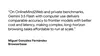
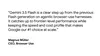
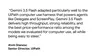
We are already seeing significant value being generated by our partners.
Getting Started
Ready to build? Follow these steps:
- Explore: Test the tools in the Browserbase demo environment.
- Develop: Access the reference implementation via the
Gemini API. - Deploy: Utilize the
Gemini Enterprise Agent Platform.
Related Updates
- Gemini 3.5 Live Translate: Natural voice translation (June 09, 2026).
- May 2026 AI Recap: The latest announcements from the AI team.
- Google I/O 2026: How Gemini helped build the event.
- Gemini Omni: Introduction to the new Omni model.