G'mic 4.0: Squaring the Pixel, Easier
G'MIC 4.0: Squaring the Pixel, Easier

After eighteen years of evolution, G’MIC (GREYC's Magic for Image Computing), the premier free and open-source framework for digital image processing, has reached a significant milestone. The release of version 4.0 represents the "version of maturity" for the project.
As is tradition, this update serves as a retrospective of the progress made since the previous August 2025 update.
[!NOTE] Pro Tip: Click on the images below to access full-resolution versions. Images featuring the
icon link to corresponding video demonstrations.
🛠️ An Open-Source Framework for Image Processing
Launched in July 2008, the G'MIC project was developed by the IMAGE team at the GREYC laboratory in Caen, France. This laboratory operates as a Joint Research Unit under the combined authority of:
- CNRS
- ENSICAEN
- University of Caen
The Technical Foundation
The framework's primary goal is to offer an extensible, open, and free environment for creating, processing, and manipulating digital images. This is achieved through a layered architecture:
- The Base: It leverages
CImg, an open-source C++ image processing library developed since 1999 (originating at INRIA and later refined within the GREYC IMAGE team). - The Core: At its heart is a specialized G'MIC language interpreter. This scripting language is optimized for the rapid prototyping of image processing algorithms and the construction of complex filter pipelines.
- The Interfaces: Multiple front-ends allow users to access hundreds of operators.
The G'MIC-Qt plugin is currently the most utilized interface, seeing a steady increase in popularity with an average of 1,200+ daily downloads. With over 640 filters, it is a powerhouse for digital artists looking to extend the native capabilities of their host software.
The 4.0 Philosophy
With the release of 4.0, the project enters a new phase. The interpreter code, the language syntax, and the core algorithms are now considered mature. Consequently, the development team is shifting priorities:
Rapid feature expansion Stability, Robustness, and Performance
Current Project Objectives:
- Finalize core language syntax
- Reach 640+ filter milestone
- Enhance framework stability
- Optimize processing performance
- Improve overall robustness
✨ New Filters in G'MIC-Qt
Version 4.0 expands the toolkit to a total of 644 filters. Below is a detailed look at the newest additions.
1. Rendering / Pixel Stretch
This filter allows users to isolate a strip of pixels and duplicate it across the canvas. The path of the stretch is defined by two customizable spline curves.

- Effect: Creates a "local stretching" look, similar to elastic dough.
- Use Cases: Stylizing motion, creating glitch art, or generating abstract textures.


2. Rendering / Gradients [Poles]
This tool generates sophisticated color gradients by interpolating between user-defined colored key points.
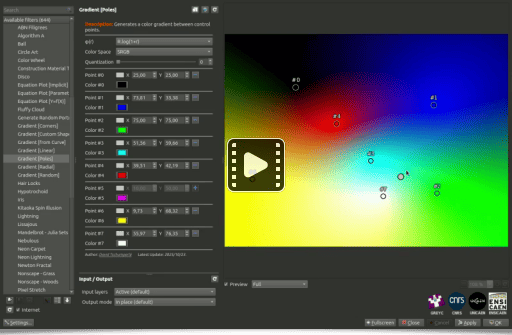
The smooth transitions are achieved using Radial Basis Functions (RBF). Mathematically, the interpolation at a point can be conceptualized as: Where represents the center of the "pole" and is the basis function. Users can also specify the color space used for these calculations.
3. Artistic / Marker Drawing
This filter simulates the appearance of an image redrawn with colored felt-tip markers.
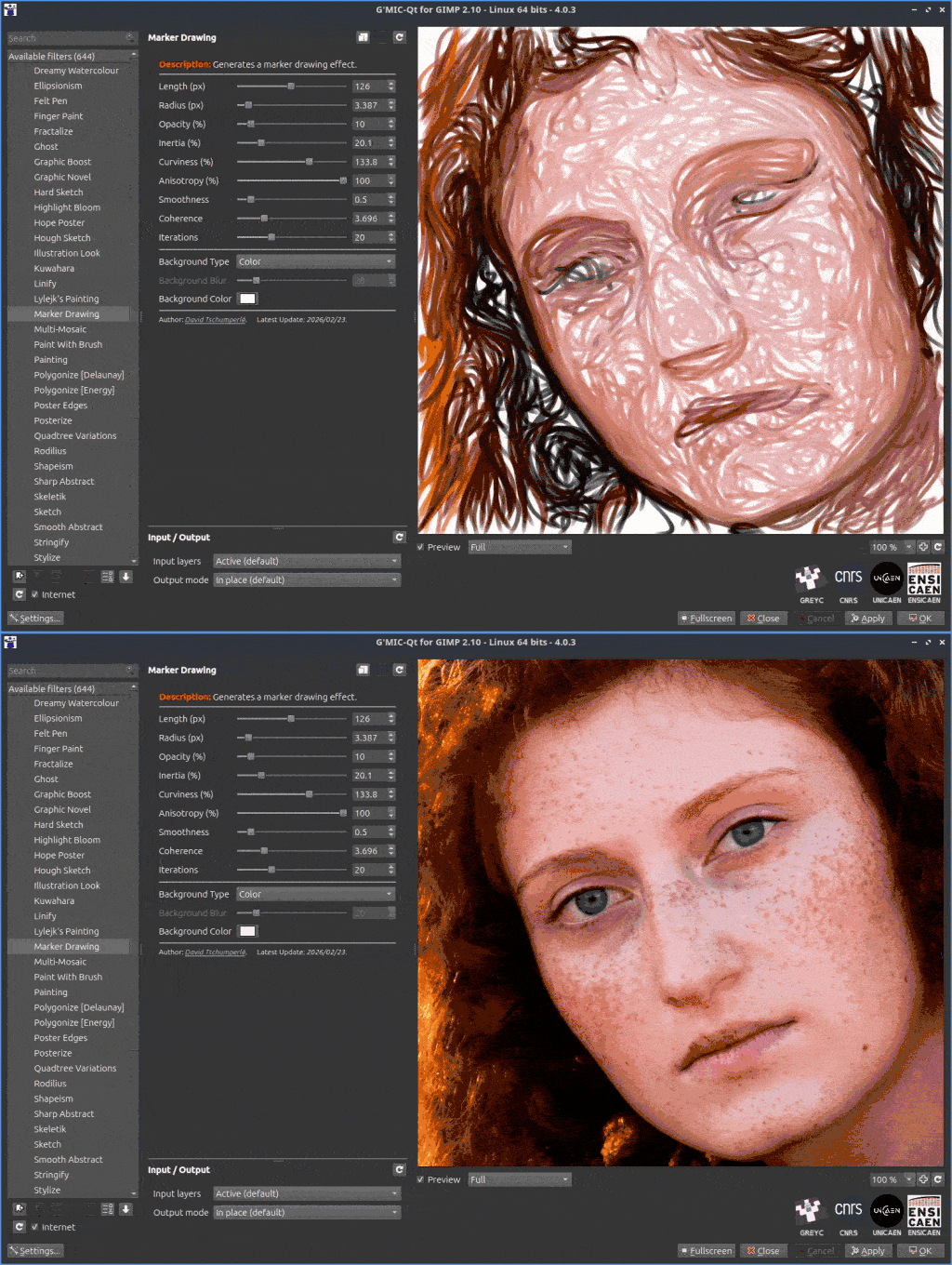
- Mechanism: The algorithm identifies geometric structures in the original image and draws random colored splines along those contours on a white background.
- Versatility: Depending on the parameters, the result can range from a realistic sketch to a highly abstract piece of art.

4. Deformations / Heightfield Warp
This filter introduces a 3D perspective by warping the image as if it were projected onto a parametric height map. To enhance the realism, it includes an optional lighting effect based on Phong shading.

📊 Summary of New Features
| Filter Name | Category | Primary Technique | Key Application |
|---|---|---|---|
| Pixel Stretch | Rendering | Spline-based duplication | Motion & Glitch Art |
| Gradients [Poles] | Rendering | Radial Basis Functions | Smooth Color Blending |
| Marker Drawing | Artistic | Contour-based splines | Felt-tip pen simulation |
| Heightfield Warp | Deformations | Parametric Height Maps | 3D Surface Effects |
