Show HN: Foremerge – Catch intent conflicts between parallel coding agents
Foremerge: Preventing Intent Collisions in Parallel AI Coding



Foremerge is an open-source coordination framework designed specifically for AI coding agents. By operating as a layer above Git, it ensures that multiple agents can work simultaneously without stepping on each other's logical toes.
While agents typically operate in isolated worktrees, Foremerge allows them to synchronize their intent, semantic claims, dependencies, provisional ChangeSets, decisions, and provenance.
🚀 The Core Value Proposition
Imagine you are using Claude Code, Cursor, or Codex. Usually, you just let them run. With Foremerge, you can:
- Instruct your agent to install it Deployment complete Identify collisions before they are committed.
- Simply paste a single line into your AI tool to trigger the installation and wiring process.
- Enable a shared visibility layer where every agent knows what others intend to modify, regardless of their separate worktrees.
Current Project Status
Version:
0.5.0(Pre-1.0 Local-first MVP)
| Feature | Status | Note |
|---|---|---|
| CLI & JSON API | ✅ | Fully Implemented |
| MCP Server | ✅ | Fully Implemented |
| SQLite Storage | ✅ | Local-first |
| Deterministic Conflict Detection | ✅ | No LLM-based guessing |
| Verification-Gated Lifecycle | ✅ | Implemented |
| Cross-Machine Coordination | ❌ | Out of scope for this project |
| Published Benchmarks | ❌ | Not yet available |
🛠 How It Works: Intent vs. Text
Standard version control systems like Git are designed to track textual changes. They are blind to semantic intent.
Git warns you when two people edit the same line. Foremerge warns you when two agents pursue conflicting goals.
The "Invisible" Conflict Scenario
Consider two agents working on a payment system:
- Agent A: Decides to migrate the entire codebase from
PaymentServiceto a newStripePaymentService. - Agent B: Decides to add PayPal support to the existing
PaymentService.
Because these agents are working in different files or different parts of the same file, Git sees no overlap. It will merge both changes successfully. The result? The PayPal integration is successfully added to a class that Agent A just deleted from every caller in the system. The work is "stranded."
The Foremerge Solution
Foremerge requires agents to announce their targets before writing code. Instead of sharing the code itself, they share a semantic claim:
"I am going to modify the sendEmail function."
Key Technical Details:
- Storage: A lightweight database located within the
.gitfolder. - Non-Blocking: It does not use hard locks. If an agent crashes, the rest of the fleet continues. Warnings are advisory.
- Deterministic: It does not ask an LLM to "judge" if a conflict exists; the logic is hard-coded to ensure the same inputs always yield the same result.
🔍 Deep Dive: The Conflict Logic
Using the previous example, the conflict can be represented mathematically as a clash of scopes:
When Foremerge detects that one agent is replacing a symbol while another is extending it, it triggers a HIGH advisory. Rather than just saying "Stop," it suggests a stable abstraction, such as creating a PaymentProvider interface.
Because Foremerge tracks the declared operation rather than the summary text, the phrasing doesn't matter. Whether the agent says "Consolidate payments onto Stripe" or "Replace PaymentService with Stripe", the system reaches the same verdict.
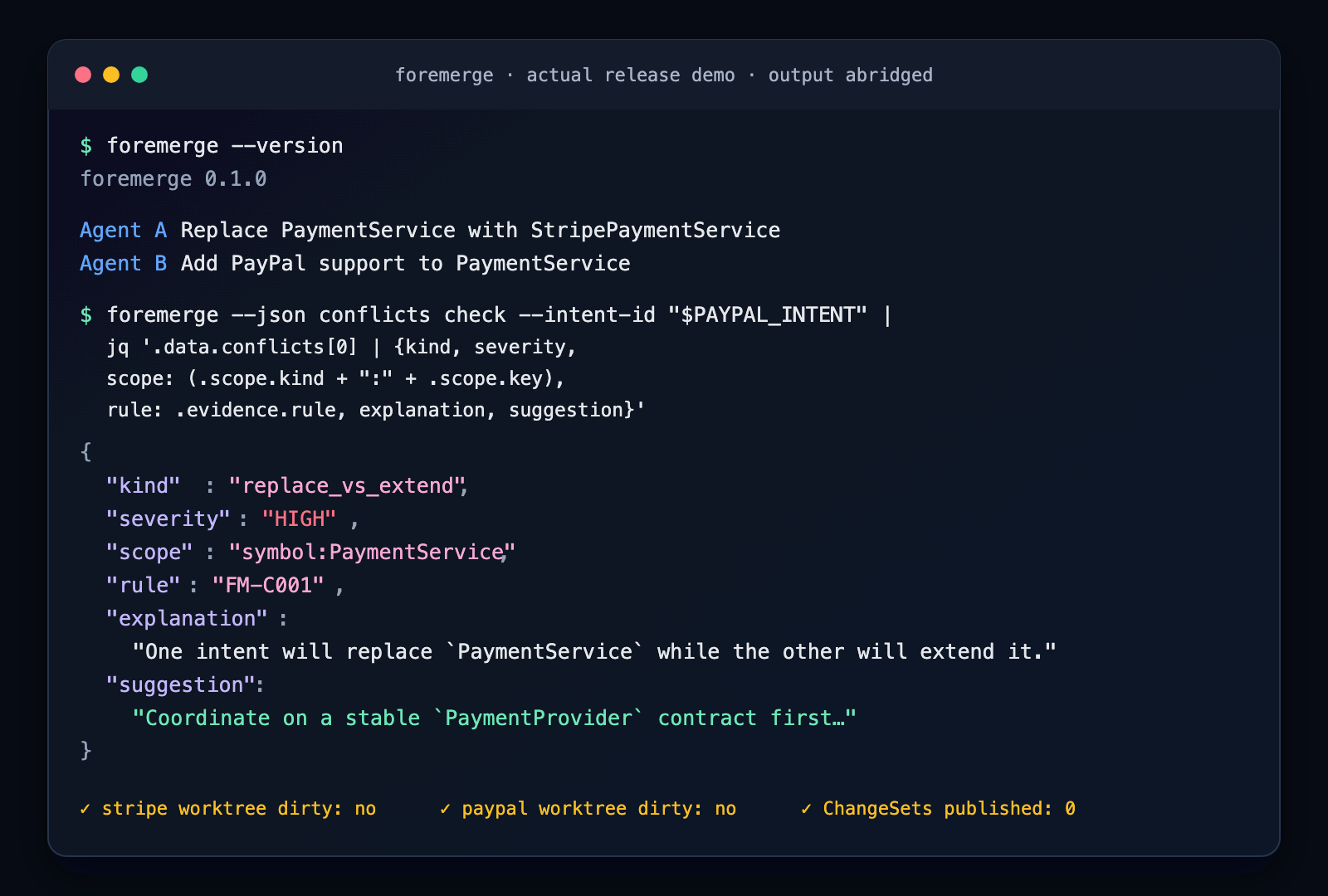 Example of a conflict detected via the 0.1.0 binary using
jq filters for readability.
⚡ Quickstart: Your First Conflict in < 5 Minutes
You can let your coding agent handle the setup. Paste the following prompt into Claude Code, Codex, or Cursor:
"Set up Foremerge in this repository so we can coordinate parallel agents."
Manual Setup Steps
If you prefer to do it manually, follow this checklist:
- Install the binary (macOS/Linux):
(Installs tocurl -fsSL https://foremerge.com/install.sh | sh~/.local/bin) - Wire the clients:
foremerge setup all - Define your validation check (e.g., using Cargo for Rust):
foremerge checks set test -- cargo test --all-targets - Verify the installation:
foremerge doctor --client all
The New Workflow
Once the "Foremerge skill" is installed in your agent, it will follow this lifecycle:
- Publish Intent Define semantic scopes.
- Claim Scope Mark the area as "under construction."
- Check Conflicts Verify no other agent is clashing before writing a single line of code.
Note: Step 3 involves enabling an MCP server, so your agent will prompt you for permission.