Noto means "no tofu": fixing dotted circles in Myanmar text
Noto means "no tofu": fixing dotted circles in Myanmar text
By Roger Tuan, Ronak Ganatra, and Silvano Stralla
Posted on October 6th, 2026


⚡ TL;DR
A client noticed that content written in S'gaw Karen was rendering with strange dotted circles when viewed in Firefox. Instead of a quick patch for one language, we dove deep into the mechanics of typography, eventually implementing a fix that supports 43 different scripts.
The CMS now utilizes Google's Noto fonts as a fallback for scripts the user's OS cannot render, loading them dynamically only when required. We discovered that true localization involves much more than just translation—it requires a deep dive into locale codes, font fallbacks, and text direction.
The "Tofu" Problem 🫠
It started with a support ticket: Fix S'gaw Karen text rendering in Firefox. For those unfamiliar, S'gaw Karen is a language primarily spoken in Thailand and Myanmar.
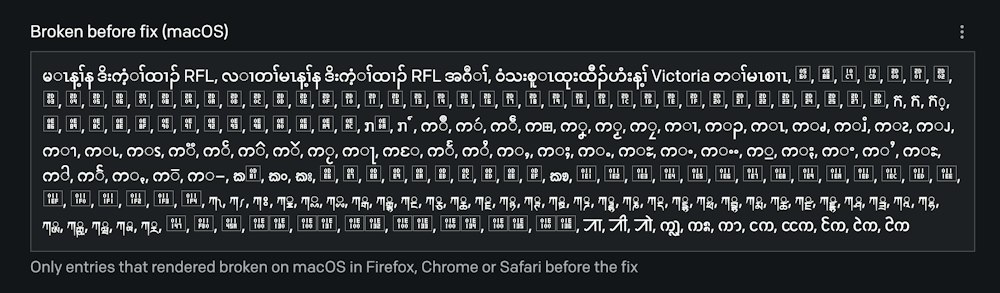
In Firefox, the text wasn't just "wrong"—it was littered with dotted circles around characters. This led us down a technical rabbit hole involving Unicode and the complexities of global text rendering.
If you manage a multilingual site via a headless CMS, the lessons we learned are likely applicable to your frontend as well. We've split this exploration into two parts: what we did and why it matters for you.
Localization is a Stack, Not a Single Step
Many people think localization is just translating text into common languages like English, Spanish, or French. However, those all share the Latin alphabet. Even adding Mandarin is just the beginning.
Real localization is a multi-layered architectural decision:
The Localization Framework
| Layer | Core Question | DatoCMS Implementation |
|---|---|---|
| Model | Which content needs translation? | Field-level localization; optional translations per model. |
| Locale | Which language and region? | Specific codes like en-GB or pt-BR (crucial since Swiss German Austrian German). |
| Workflow | Who translates, QAs, and publishes? | Locale-based permissions, scheduling, and AI Translation plugins. |
| Delivery | What happens if a translation is missing? | Use of fallbackLocales, _locales, and _allFieldLocales in the API. |
| Direction | Which way does the text run? | LTR (Left-to-Right), RTL (Right-to-Left), or TTB (Top-to-Bottom). |
| Rendering | Can the device actually draw the glyphs? | Ensuring the CMS and frontend can render the specific script. |
Note: Most developers focus on the top of this stack. However, the bottom layer—Rendering—is where rare scripts break, and it's often invisible until a user with a specific OS/browser combination encounters it.
The Nuance:
This is where things get complex. These three concepts do not always align linearly.
- S'gaw Karen is a language, but it uses the Myanmar script (also used by Burmese, Shan, and Mon).
- Serbian can be written in either Cyrillic or Latin scripts.
- Punjabi uses Gurmukhi in India but Shahmukhi in Pakistan.
- Locale codes vary:
karrefers to Karen languages generally, whilekswspecifically denotes S'gaw Karen.
Complex Script Behaviors
Latin-based reading doesn't prepare you for how other scripts function:
- Stacking: Myanmar and Balinese scripts stack consonants vertically.
- Reordering: In Khmer and Myanmar, some vowels are typed after a consonant but rendered before it.
- Spacing: Lao, Khmer, and Myanmar typically do not use spaces between words.
- Directionality: 6 of our 43 new scripts are RTL (Right-to-Left), including
Adlam,N'Ko, andSyriac.
Script Samples
Here is how some of these scripts look when rendered correctly:
| Script | Sample | Phonetic/Literal | Used For |
|---|---|---|---|
| Myanmar | မြန်မာ | Myanmar | Burmese, S'gaw Karen, Mon |
| Georgian | ქართული | Kartuli | Georgian, Svan |
| Ethiopic | ግዕዝ | Ge'ez | Amharic, Tigrinya |
| Khmer | ខ្មែរ | Khmer | Khmer |
| Tibetan | བོད་ | Böd | Tibetan, Dzongkha |
| Cherokee | ᏣᎳᎩ | Tsalagi | Cherokee |
| Tifinagh | ⵜⵉⴼⵉⵏⴰⵖ | Tifinagh | Tamazight |
Understanding "Tofu" and Dotted Circles
When a browser fails to render a script, it usually happens in one of two ways:
- Tofu (The Empty Box): The browser searched every available font and found no glyph for that character. It renders a (hence the name "tofu").
- Dotted Circles: The browser found a font, but the text shaping engine failed to combine the characters. In scripts like Myanmar, syllables are built from a base letter plus modifiers. If they can't be stitched together, the modifier is placed on a dotted circle—essentially the browser saying, "I have this mark, but I don't know which letter it belongs to."
Because rendering depends on the OS, the browser, and installed fonts, you cannot simply "fix it once." Every user has a different fallback chain.
The Solution: Noto Fonts
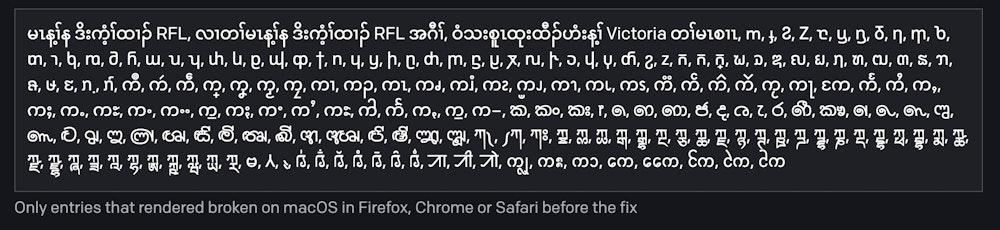
To solve this, we implemented Google's Noto (which literally stands for "No Tofu") fonts. Instead of relying on the user's system, the CMS now provides a reliable fallback.
To keep performance high, we don't load every script at once. We use a dynamic loading strategy:
// Conceptual logic for dynamic font loading
if (contentContainsScript(scriptId)) {
  loadNotoFont(scriptId);
}
Your Font Hunting Checklist
If you are building a truly global application, use this checklist to ensure your users aren't seeing tofu:
- Identify all target scripts (not just languages).
- Test across multiple OS/Browser combos (Windows/Chrome macOS/Safari Linux/Firefox).
- Verify text direction (Ensure
dir="rtl"is applied to the HTML element for RTL scripts). - Implement a robust fallback chain (e.g.,
font-family: 'YourBrandFont', 'Noto Sans Myanmar', sans-serif;). - Check for "shaping" issues (Look for those dreaded dotted circles).