PSPi 6 – Raspberry Pi in a PSP
PSPi 6: Integrating a Raspberry Pi into a PSP

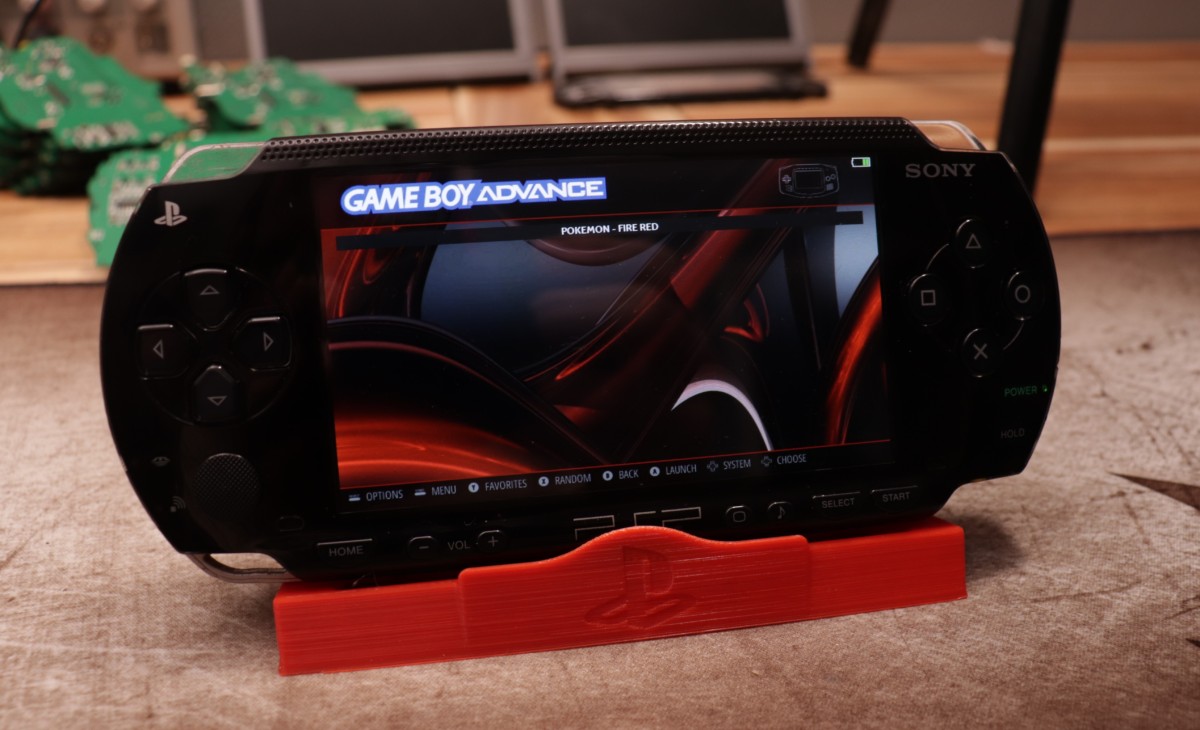
The PSPi 6 is a dedicated passion project designed to breathe new life into the classic PSP 1000 by transforming it into a contemporary handheld device powered by a Raspberry Pi. By replacing the original mainboard with a custom-engineered circuit, the PSPi 6 allows the handheld to function as a versatile portable computer.
🚀 Core Capabilities
With this modification, your device is no longer limited to original PSP software. You can now:
- Launch various retro gaming emulators.
- Operate full-scale Linux distributions.
- Execute almost any software compatible with the Raspberry Pi ecosystem.
🛠 Technical Specifications & Features
The hardware is designed to maximize the utility of the original chassis while adding modern functionality.
| Feature | Description |
|---|---|
| Display | High-definition LCD with brightness control. |
| Power | Integrated efficient charging, real-time battery telemetry, and power-saving modes. |
| Audio | Support for internal speakers and headphones; volume/mute via native buttons. |
| Controls | Full integration of original buttons/joystick, plus and . |
| Feedback | System status provided via LED indicators and an On-Screen Display (OSD). |
| Philosophy | Open-source hardware released under a Creative Commons license. |
[!IMPORTANT] Audio Note: Currently, the Pi Zero and CM4 Carrier boards provide mono audio. Stereo output is planned for the upcoming Universal Carrier.
The screen aspect ratio can be expressed as:
🧩 Compatibility Matrix
Hardware Requirements
- Handheld: This project is
compatible with all PSPsexclusively for the PSP 1000 series. - Computing Brain:
- Physical Fit: Only the
Raspberry Pi ZeroandZero 2Wfit natively in the shell. - Alternative: The
CM4is supported via a specific Carrier board. - Electricals: While electrically compatible with all 40-pin Raspberry Pi models, physical dimensions are the limiting factor.
- Physical Fit: Only the
Software Support
The board is compatible with a wide array of operating systems, including but not limited to:
RetroPie&Batocera(Gaming)Lakka(Emulation)Ubuntu&Raspberry Pi OS(General Purpose)Kali(Security/Testing)
🛠 Build Process
To successfully implement the PSPi 6, follow this general workflow:
Getting Started Checklist
- Source Parts: Consult the Components Required wiki.
- Assemble Hardware: Refer to the Board Installation guides (video tutorials available).
- Flash Software: Follow the Operating Systems wiki to install your preferred OS.
🛒 Acquisition Options
Depending on your technical skill level, there are two ways to obtain a PSPi 6:
- The Plug-and-Play Route: Purchase a pre-assembled board directly from
othermod.com. - The DIY Route: Manufacture your own PCB using the provided design files.
- Files are located in the
/boardsdirectory. Warning: This path requires advanced soldering skills and electronics knowledge.
- Files are located in the
Repository Structure
PSPi-Version-6/
├── .github/        # GitHub configurations
├── atmega/         # Microcontroller firmware
├── boards/         # PCB design files <--- DIY files here
├── rpi/            # Raspberry Pi specific configs
└── scripts/        # Utility scripts
📈 Project Status & Community
Current State: The PSPi 6 board is fully developed and currently shipping. While the core features are locked in, the creator occasionally implements minor refinements and is actively expanding the documentation.
How to Contribute
The creator welcomes community input to refine the project:
- Technical: Report bugs or propose new features.
- Social: Join the Discord to share mods or troubleshoot.
- Documentation: Help improve the guides for new users.
- Awareness: Spread the word about the project.
Support the Vision
If you wish to fund further development, donations are accepted via:
- PayPal
- Patreon
Stay in Touch
- Community: Discord
- Tutorials: YouTube
- Web: othermod.com
License: This hardware design is open-source under the Creative Commons (CC BY-SA) license. You are encouraged to share and modify the work, provided appropriate credit is given.