The tilde in your PATH may not be your HOME
The tilde in your PATH may not be your HOME
Posted on 2026-10-02 • Tags: #shell, #bash, #zsh, #security
While experimenting with the nono sandboxing utility, I encountered a rather peculiar warning:
PATH entries the sandbox can write to: ~/.local/bin/
At first glance, this seemed odd. Why would a sandbox be able to write to my home directory's bin folder? This led me to a realization about how shells handle the tilde (~) character.
The Core Issue: Tilde Expansion
If you have a line like this in your ~/.bashrc or ~/.zshrc:
export PATH = " $PATH :~/.local/bin/"
You might assume the ~ automatically converts to your home directory. It does not. Tilde expansion only occurs when the character is unquoted. As the official Bash documentation clarifies:
If a word begins with an unquoted tilde character (‘~’), all of the characters up to the first unquoted slash (…) are considered a tilde-prefix.
(…) Bash checks each variable assignment for unquoted tilde-prefixes immediately following a ‘:’ or the first ‘=’, and performs tilde expansion in these cases.
Mathematically, we can view the expansion function as:
Consequently, instead of adding /home/user/.local/bin/ to your environment, you are actually adding a literal path: ./~/.local/bin/.
Comparison of Methods
| Syntax | Result | Status | Note |
|---|---|---|---|
PATH="$PATH:~/.local/bin/" | Literal ~ | ❌ Wrong | Quoted tildes don't expand. |
PATH=$PATH:~/.local/bin | Expanded Path | ✅ Works | Unquoted expansion is active. |
PATH="$PATH:$HOME/.local/bin/" | Expanded Path | 🌟 Best | Explicit and safe. |
Relying on unquoted assignments is a great idea Actually, it is fragile. For instance, adding a single accidental whitespace will break the variable assignment entirely.
Proof of Concept
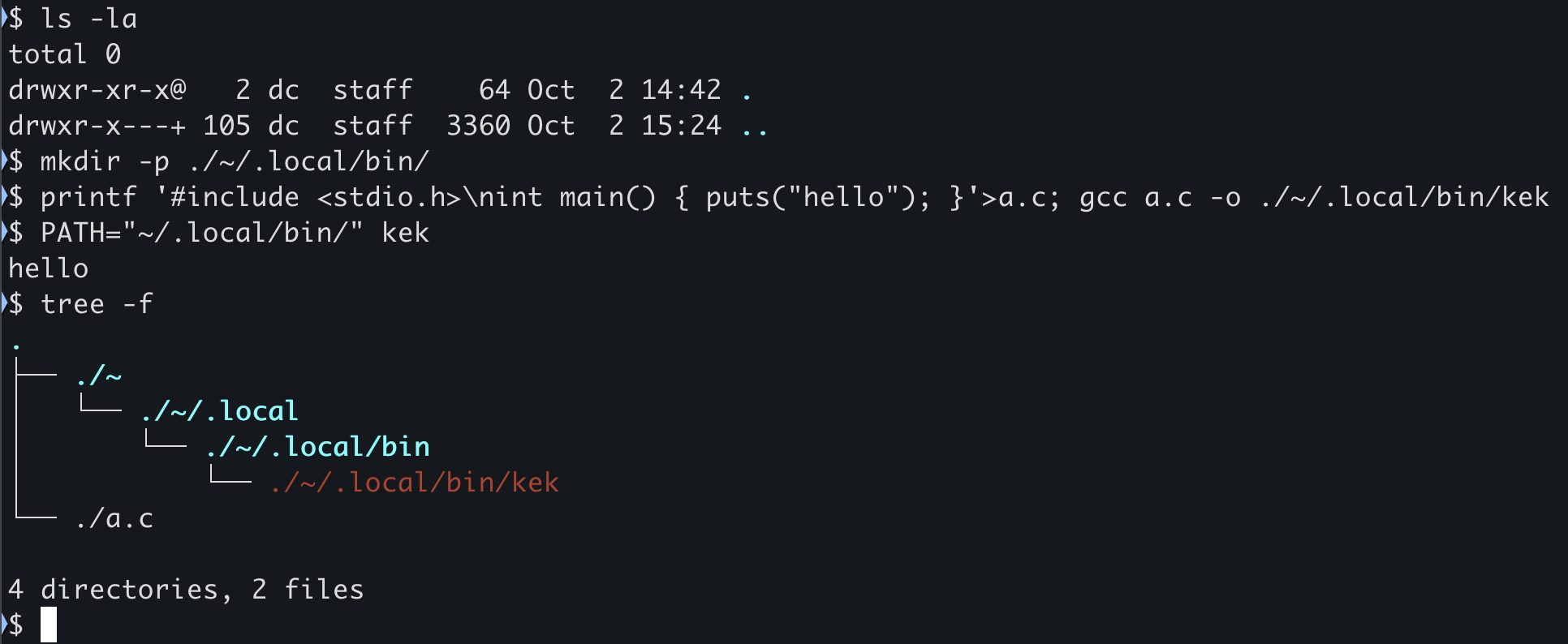
To demonstrate this, I created a scenario where a binary is executed from a literal tilde directory rather than the actual home folder:
# Create a literal directory named '~' in the current folder
$ mkdir -p ./~/.local/bin/

# Compile a simple C program into that directory
$ printf '#include stdio.h \nint main() { puts("hello"); }' a.c
$ gcc a.c -o ./~/.local/bin/kek

# Set PATH to the literal tilde path and run the binary
$ PATH = "~/.local/bin/"
$ kek
hello
The resulting directory structure looks like this:
As shown by the tree -f . output, the kek binary was found and executed from ./~/.local/bin/. The actual $HOME directory was never accessed.
How to Audit and Fix Your Setup
You can verify if your PATH is contaminated with literal tildes using these commands:
- Quick check:
echo "$PATH" | grep -- '~' - Detailed list:
echo "$PATH" | tr ':' '\n' | grep '~'
If you see ~/.local/bin/ (or similar) in the output, follow these steps:
- Open your configuration file (
.bashrc,.zshrc, or.profile). - Locate the
PATHexport line. - Replace
~with the$HOMEvariable. - Restart your shell or run
source ~/.bashrc.

Finally, a shout-out to the nono tool for flagging this security quirk, although the warning message could be a bit more descriptive (I'll be submitting a PR to improve it!).