Fixing Tool-Call Accuracy in vLLM
Fixing Tool-Call Accuracy in vLLM

Date: October 20, 2026 | Read Time: 8 min
Authors: Jesse Donkervliet and Junhao Li (Senior Software Engineers)
The Gap Between Benchmarks and Reality
Many software developers working with AI have noticed a frustrating trend: when deploying open-weight models, the actual performance often feels completely different significantly lower than what the official quality benchmarks suggest.
"When I use an open-weight model, I see results that are nowhere close to what the quality benchmarks indicate."
A critical component of this discrepancy is tool-call accuracy. For agentic workloads—where the AI must engage in multi-turn sessions—precision is everything. If a model generates a tool call that doesn't adhere to the required schema, it creates "nonsensical context." This error then compounds, leading to a total collapse in output quality.
The Accuracy Problem
Surprisingly, many popular inference engines and providers fail basic tool-call accuracy tests.
Case Study: Kimi K2.6 on vLLM v0.28 When testing Kimi K2.6, the team found that the model only produced the correct schema of the time. Mathematically, the failure rate was: In practical terms, this means 2 out of every 25 tool calls were broken.
| vLLM Version | Model | Schema Accuracy | Status |
|---|---|---|---|
| 0.28 | Kimi K2.6 | 92% | ❌ Unreliable |
| 0.31 | Kimi / DeepSeek | 100% | ✅ Guaranteed |
The Solution: Constrained Decoding
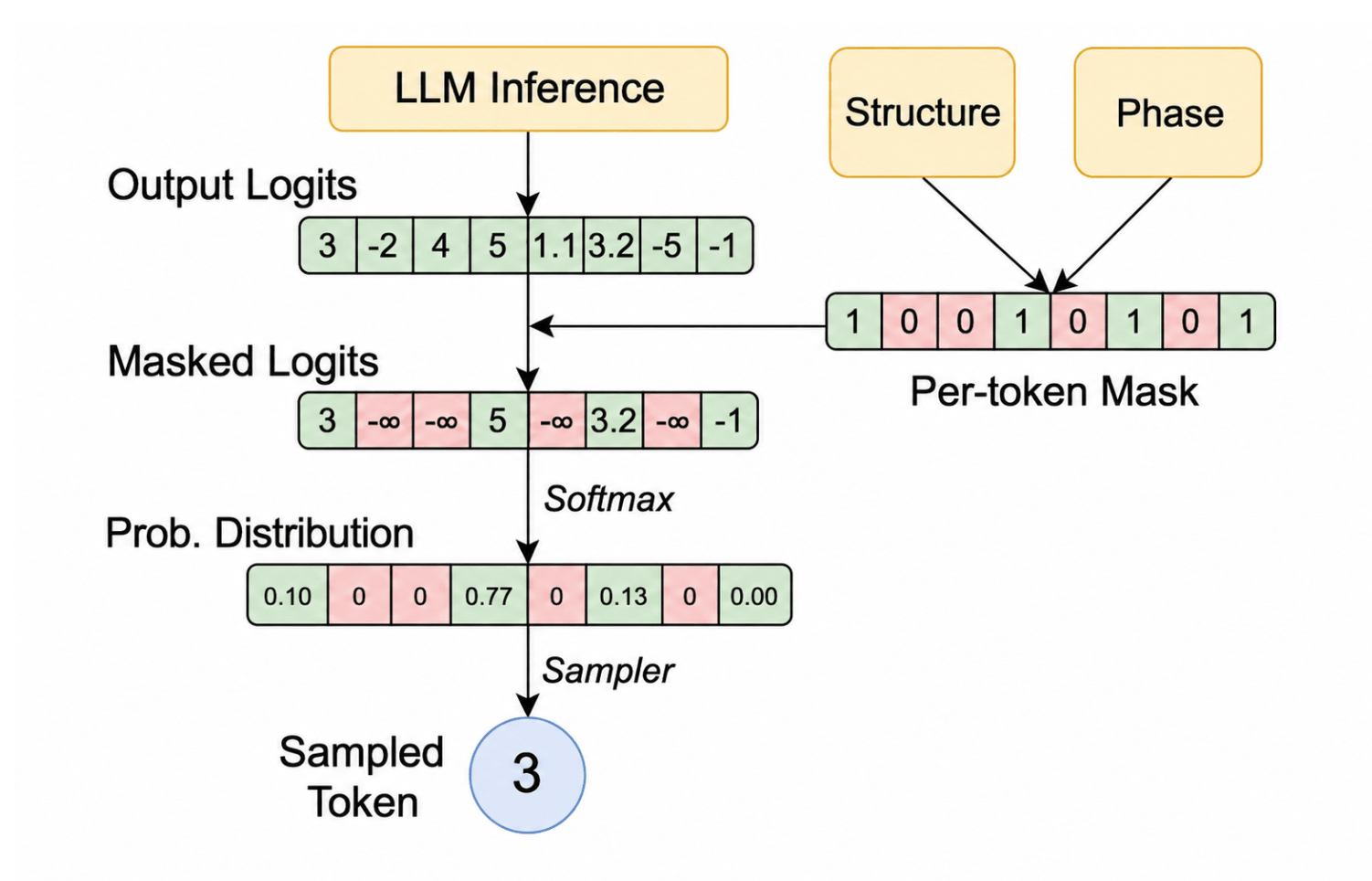
To solve this, vLLM has introduced constrained decoding. This is a technique that forces the model to adhere strictly to a predefined schema, effectively eliminating "hallucinated" syntax in tool calls.
This functionality was released as a server-side flag in vLLM 0.31. By enabling this flag, users can achieve schema accuracy with modern models like DeepSeek and Kimi.
Implementation Checklist
- Update vLLM to version
0.31or higher. - Identify the target model (e.g., Kimi K2.6, DeepSeek).
- Enable the constrained decoding server-side flag.
- Verify schema adherence in agentic loops.
Understanding Tool-Call Schemas
To enable an LLM to interact with external tools, a two-step process is required:
- Notification: Tell the model which tools exist.
- Instruction: Define exactly how the model should format the request to use those tools.
Example: The webfetch Tool
When an agent harness (like OpenCode) connects to Kimi, it passes a JSON array. Here is the schema for a tool called webfetch:
[{
  "type": "function",
  "function": {
    "name": "webfetch",
    "description": "- Fetches content from a specified URL\n- Takes a URL and optional format as input\n- Returns the content in the specified format\n- Use this tool when you need to retrieve and analyze web content",
    "parameters": {
      "$schema": "https://json-schema.org/draft/2020-12/schema",
      "type": "object",
      "properties": {
        "url": { "type": "string", "description": "The URL to fetch content from" },
        "format": {
          "type": "string",
          "enum": ["text", "markdown", "html"],
          "description": "The format to return the content in",
          "default": "markdown"
        },
        "timeout": { "type": "number", "description": "Optional timeout in seconds (max 120)" }
      },
      "required": ["url"]
    }
  }
}]
The Inference Pipeline
The inference engine doesn't just send raw JSON; it wraps the description in specific tokens that the LLM was trained to recognize.
The Token Wrapper:
|im_system| tool_declare |im_middle| [{ "type": "function", ... }] |im_end|
Workflow Diagram
The Final Output
When a user asks to fetch a page, the LLM generates a sequence of tokens to trigger the tool:
I'll fetch that page. |tool_calls_section_begin| |tool_call_begin| functions.webfetch: 0 |tool_call_argument_begin| { "url": "https://ubicloud.com", "format": "markdown" } |t
Visual Assets & References
- Authors:

- Navigation:


- Links: